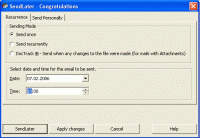
SendLater is a convenient e-mail scheduler allowing you to handle your e-mail correspondence in a timely manner even if you are away from your computer. As long as your computer is online, your e-mail will be sent automatically at the scheduled time.
SendLater is a convenient e-mail scheduler allowing you to handle your e-mail correspondence in a timely manner even if you are away from your computer. Your computer will never forget to send an important business or personal message. Prepare all your email notifications and reminders, greetings in advance and schedule requrrence their delivery. As long as your computer is online, your e-mail will be sent automatically even Outlook is not running. The program is easy to install and easy to handle. Each time you reply or create a new e-mail message, you will be able to choose a particular time and recurrence for your PC to send your message. Just click the "SendLater" icon on the toolbar and select the sending time using time-and-date/recurrence selector. Click "Send later" and your message will be scheduled for that time/recurrence and saved in the "Send Later" folder. Be sure that it will be sent exactly at the time and recurrence of your choice. And at any time, you can open the "Send Later" folder and edit, remove or send your messages manually. You can specify the bulk of e-mails and the time interval for the split e-mail sending. "Send Now" feature now allows you to send e-mails from the Internet pages "mailto:" links, Office or other programs right away, without opening Outlook.
The "Grab File" feature for attachments: automatically "grabs" the last-modified document from you specified location. The "Ignore file" list and "Ignore hidden and system files" feature: allows for ignoring the unwanted files to be "grabbed".
SendLater examples of use:
- No more reminders needed. Schedule repetitive emails at daily, weekly, monthly or even yearly intervals.
- Monthly billing notifications
- direct marketing letters and reports
- routine company meetings reminders
- never miss birthdays, anniversaries, and holiday greetings and etc. Whats new in version 3.33.0826:
New features:
• SendLater Options Configuration Wizard - introduces SendLater options step-by-step and makes it easier to configure them.
• IMAP account support - if it is default or the only one configured account.
• Exchange Active Sync account support - if it is default or the only one configured account.
• A new Welcome Screen
• Some other fixes and performance improvements done.
Requirements: Outlook 2000/2002/2003/2007/2010 Operating system: Windows XP / Vista / 7 / 8 / 2003 / 2008 / 10 / 10 64 bit Limitations: 14 day trial Release notes: Major Update
You can extract up to 100,000 unique email addressees per hour from newsgroup postings with this simple to use tool. Works many times faster than search engine email extraction programs that use multi threading.
Price: $50.00, Rating: 7, Downloads: 98 Download
Programa freeware que envia emails sem usar o SMTP do seu provedor simulando um servidor SMTP em seu próprio computador para conectar-se diretamente aos servidores de e-mails dos destinatários e entregar as mensagens sem sobrecarregar o seu provedor
Price: $, Rating: 10, Downloads: 76 Download
Automatically search web sites for emails. Simply provide starting keywords and the let Software do the rest. Email Grabber will crawl the web sites and collect all email addresses it finds and stores the found adresses as txt file.
Price: $3.00, Rating: 6, Downloads: 73 Download
A Country Thanksgiving Email Stationery by Cloudeight, featuring nostalgic art by John Zed King. This set of 12 scrolling, musical email stationery come in a self-installing file ready to use in your email.
Price: $0, Rating: 7, Downloads: 71 Download
User Rating
Rating:2.2 out of
5 Based on13 ratings.
13 user reviews.

 SendLater 3.33.0826 details